Megan O’Brien
In short:
- Economic volatility has put the shortcomings of traditional budgeting methodologies on full display.
- The smart money is moving toward rolling forecasts as a better way to predict business performance — and get finance in line with sales, marketing and production.
- Here’s why this more iterative planning style allows companies to react more quickly to both opportunities and disruptions, plus tips on how to get started.
Mike Tyson famously said, “Everybody has a plan until they get punched in the mouth.” The pandemic has been a solid uppercut worthy of Mike himself. And it doesn’t take a first-quarter TKO; financial plans get smacked around every year, especially for growing businesses. It could be an external event, like a new round of tariffs, wreaking havoc with suppliers. Maybe that product you introduced is a huge hit, or you make hand sanitiser and there’s suddenly an interest in cleanliness.
It’s usually not one punch but a series of small jabs that knock forecasts off track.
Meanwhile, finance teams really wish their line-of-business colleagues would pay more attention to budgets, but unless the budget is accurate to the moment, why would they? And yet the cycle persists.
Let’s face it: Distaste over budgeting and forecasting tedium isn’t new. Former GE CEO Jack Welsh made his feelings quite clear in his book(opens in a new tab) on the topic, calling the process the “bane of corporate America.” Now, an increasing number of organisations are realising that the “let’s just check the box” method of creating a politically agreeable financial plan isn’t benefiting the business.
If “static” isn’t working, then “dynamic” must be the solution. But a dynamic — aka rolling — forecasting methodology demands a very different approach.
Get an overview of rolling forecasts and five tips for creating them, which we’ll cover in detail below:
What Are Rolling Forecasts?
The goal of budgeting is to create a financial plan and projections to evaluate business performance, guide resource allocation, inform investment strategies and make intelligent decisions quickly. What’s not to love?
Except that businesses — and on a more granular level, finance departments — don’t exist in a vacuum. A budget, and subsequent forecasts, are formulated based on a set of assumptions that are generally reflective of past operating conditions plus some educated guesses about the future.
Problem is, we’re really bad at predicting the future. In a 2015 study by KPMG and the Association of Chartered Certified Accountants (ACCA)(opens in a new tab), 62% of respondents agreed that budgets are simply a “point in time” view and don’t even reflect what is happening externally in the market.
The other 38% may have a spreadsheet fetish. It’s hard to say.
“Think of when a business is starting out — it’s concentrating on increasing sales and improving delivery of goods and services,” said(opens in a new tab) Thomas Sutter from NetSuite’s Global Solutions Centre of Excellence. “There are so many unknowns, they really have no idea of what’s going to happen in the next 12 months, so the budget rarely has any actual relation to the business outlook. But, of course, investors want to know what the business is expecting. So, the finance team and executives go through this whole tick-box exercise that’s time-consuming and manual — none of which is supporting the growth of the business — and the budget is created based on outdated assumptions and past data.”
It doesn’t help that, once planning is done, most C-suite executives put the budget in a virtual drawer until the end of the quarter, or worse, the next budgeting cycle. A notable exception is the finance department, and that puts the CFO at odds with peers.
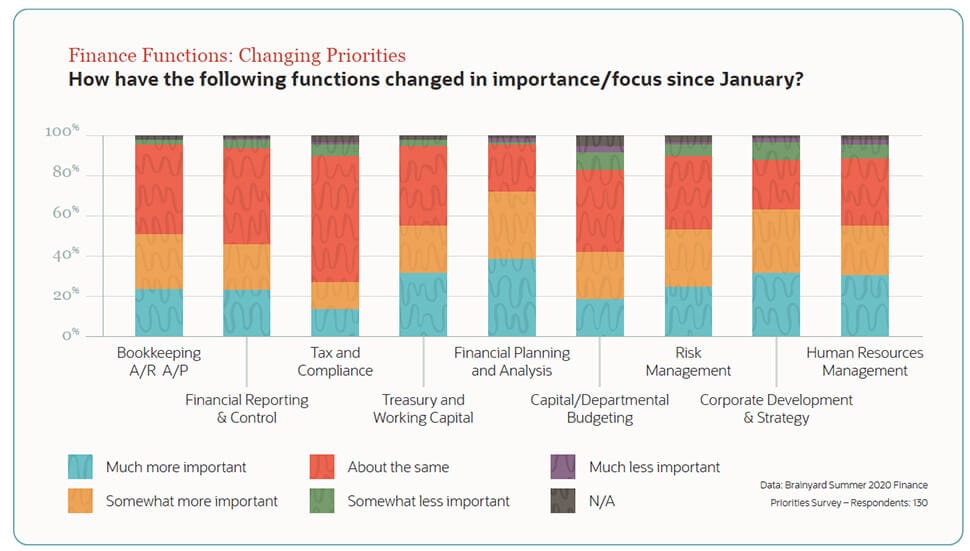
The planning/budgeting/forecasting process is seen as an exercise imposed by finance and yielding little benefit to departments. That dynamic doesn’t seem to be changing; in fact, a majority of respondents to our Brainyard Summer 2020 Survey(opens in a new tab) say planning and analysis are now somewhat or much more important functions for the finance team.
Sales, production and marketing teams argue that they constantly measure the effects of what they do and continually adjust to optimise results. Being pulled in to discuss why numbers aren’t following a forecast made six months ago is frustrating.
If those teams constitute the dog, finance is the tail. Rolling forecasts help everyone wag together.
“Rolling forecasts are a best-practice framework that helps organisations account for and dynamically adapt to market changes and competition,” said Rami Ali, senior product marketing manager of planning and budgeting at Oracle NetSuite. “Instead of using a static annual budget that is quickly obsolete, you use a rolling forecast to continuously update a plan and budget assumptions.”
This technique relies on an “add/drop” approach to forecasting that creates new periods on a rolling or continuous basis over a set duration. For example, if a company’s rolling forecast period stretches 12 months into the future, as each month ends, the numbers recorded that month will be used to add another month to the forecast — January 2023 ends and January 2024 is “added on.”
In this way, the forecast horizon continues to roll forward, based on the most current data available. The defined period can vary based on business preference and capabilities; common options include forecasting ahead by 12, 18 or 24 months or four, six or eight quarters. This helps companies more-reliably project future outcomes based on year-to-date results and actuals in relation to the original budget and previous forecasts. But the real focus is on getting the next quarter or two right and understanding that subsequent quarters come with the same uncertainty they always did.
Rolling Forecast Example:
Set duration is one year and update cadence is
monthly
Original 12 periods (month) forecast |
Rolling forecast maintains 12 periods | |||||||||||||
| Jul | Aug | Sep | Oct | Nov | Dec | Jan | Feb | Mar | Apr | May | Jun | Jul | Aug | Sep |
| 1 | 2 | 3 | 4 | 5 | 6 | 7 | 8 | 9 | 10 | 11 | 12 | |||
| 1 | 2 | 3 | 4 | 5 | 6 | 7 | 8 | 9 | 10 | 11 | 12 | |||
| 1 | 2 | 3 | 4 | 5 | 6 | 7 | 8 | 9 | 10 | 11 | 12 | |||
| 1 | 2 | 3 | 4 | 5 | 6 | 7 | 8 | 9 | 10 | 11 | 12 | |||
“[This allows] finance leaders to modify objectives, plans and resource allocations to quickly respond to industry, market and economic changes and trends,” said Ali. “Rolling forecasts offer a way to adjust plans quickly with enough insight to make critical decisions on a deadline.”
Making the process workable requires that finance teams know and understand how various divisions are changing their forecasts — often on a monthly basis. Some factors, like procurement issues or changing accounts receivables, will be clear to finance, but sales projections, manufacturing output or marketing lead flow might not be.
Key factors in making rolling projections work include selecting the right period cadence and taking the friction out of gathering the data that finance needs to make its renewed updates.
Traditional vs. Rolling Forecasts
| Traditional Forecasting | Rolling Forecasting |
|---|---|
| Fixed financial plan calculated for a set period of time, typically one year, that uses historical observations to estimate future business metrics. | A “live” financial plan that is regularly updated throughout the year to reflect changes. |
| Calendar-based (annual, quarterly) | Event-based with real-time adjustments to calendar forecasts |
| Fixed targets (sales/profit, other KPIs) | Dynamic adjustments to targets based on external/internal events |
| Resource allocations are rigid | May trigger reallocation of resources based on dynamic targets |
| Manual, account-based and often linked to accounting cycles | Business-driver-based and connected to operations |
Prerequisites for Rolling Forecast Adoption
Dynamic forecasting is its own beast. Simply taking the process you've used for annual forecasting and trying to do it over and over, faster and faster, won’t be popular with anyone.
Here's how Ali recommends getting started:
- Culture: To successfully implement a rolling forecast practice, everyone has to buy in, especially upper management. Explain to sales, marketing, production and other departments what’s in it for them.
- Alignment, Collaboration and Participation: The process involves people from various business units, both financial and non-financial. Everyone needs to understand their respective roles and what they are accountable for. On the flip side, finance needs to control the process and keep the team lean and functional.
- Talent: Finance staffs need to make this easy for peers. Communication delivers results. Helping a sales team justify another headcount based on highly accurate projections will win converts. (See: what’s in for them.) But delivering those insights takes experienced and talented finance pros(opens in a new tab).
- Systems: Having supporting systems in place is essential. Ideally, data flows into the forecast automatically. And once you create a baseline forecast, you’ve only just started. Additional analysis and constant updates are the whole point, and that typically stresses spreadsheets beyond their best use.
- Models: Models should be driver-based — meaning that they focus on elements that directly impact the financial or operational performance of the business. That facilitates planning for different scenarios and forecasts. Again, many companies try to build models in Excel, a process that’s labour-intensive and prone to errors.
- Data: Rolling forecasts are only as good as the data they use. This methodology requires frequent imports of actuals — metrics like labour rate, purchase price and selling price — into the models for variance analysis(opens in a new tab) to ensure things are on track. Forecasts based on drivers and real-time assumptions are more likely to be actionable. By integrating actuals with forecasts, organisations can identify issues early and refocus priorities and resources as necessary.
Moving to rolling forecasts is a big job, but the result is that finance is updating its projections as the other departments within the company are updating theirs. The value to both senior management and the departments themselves is clear. The “yes” or “no” call on new resource requests is backed up by accurate forecasts. Decision-makers don’t have to guess at the big picture because finance replaces (or at least supplements) gut instinct with current data and models.
Pros & Cons of Rolling Forecasts
| Pros | Cons |
|---|---|
| Stays up-to-date, whereas traditional forecasting is quickly rendered obsolete | Costly if forecasting process isn’t automated |
| Provides proactiveness, agility and flexibility to accommodate changes and trends | Can be more time-consuming, with increased oversight needed, particularly at first |
| Increased control over finances | Requires accurate and timely data |
| Better enables leaders to adjust to time-sensitive business opportunities and risks | Could make a business rely too much on reallocating funds, which could hinder it from reaching long-term financial goals |
| Provides continuous access to long-term data for business decisions | Possible increased workload for business managers |
| Allows for better, more informed resource allocation | |
| Adding KPIs and key business drivers to the process helps improve forecast quality |
More Forecasting Resources From NetSuite
-
Key Financial Forecasting Methods Explained
Equip yourself with specific and accurate financial predictions by reviewing the collection of forecasting techniques and methods you can choose from, depending on the data you’re using and the purpose of your output.
-
Financial Data at Your Fingertips(opens in a new tab)
Get the accurate and up-to-date data you need to create a rolling forecast with systems like NetSuite ERP. In this demo, you’ll watch as our tool distills financial data into easy-to-read charts, pivot tables, dashboards of top KPIs and more.
-
NetSuite Planning and Budgeting
Quickly adjust budget models to reflect changing assumptions in our faster, more accurate alternative to spreadsheets. In NetSuite Planning and Budgeting, you can click to drill across budget, forecast and actuals and see their impact on business performance.
5 Best Practices for Successful Rolling Forecasts
Driver-based forecasting entails basing forecasts on elements that impact the operational and financial results of the business while focusing less on the minutiae of budgeting.
1. Identify key drivers
Have I lost you? Let me reel you back in with a baseball — and Brad Pitt — example. Moneyball, the 2003 bestselling book by Michael Lewis and then 2011 film adaptation starring Pitt, details the Oakland Athletics’ adoption of sabermetrics(opens in a new tab). The book and film detail how Oakland Athletics GM Billy Beane, in an effort to build a competitive baseball team on a limited budget, rethought how to assess player value.
Upending traditional baseball wisdom that emphasised statistics like stolen bases, runs batted in and batting average, as well as the intuition of scouts, Beane turned to rigorous statistical analysis. Through their analytical, evidence-based sabermetric approach, Beane and his team determined that on-base and slugging percentages were better indicators of offensive prowess.
In other words, they found their team’s key drivers for success.
Driver-based forecasting operates in a similar fashion. The process identifies key operational metrics — like number of subscribers/customers, market share, average price and number of sales — that directly influence a company’s performance. Selected metrics are then added to the system so any changes to operational activities can be highlighted and accounted for throughout the year.
There is no optimal or preferred number of drivers(opens in a new tab). Rather, they will vary based on business model, what the company is trying to measure, analytical insights desired, company sise, industry and numerous other factors, both internal and external. However, when identifying the key drivers and metrics for your business, these five questions can guide the process:
- What is driving revenue and expenses? Do these line items have enough materiality to be considered?
- What are our business needs and goals, and which drivers line up with them?
- Should we consider including external drivers, such as GDP?
- Who in the organisation is closest to each respective driver?
- What data will feed into the driver?
Remember, be discerning in choosing key drivers. Focus on the critical few, not the trivial many.
2. Determine the set period
The horizon of a rolling forecast can vary. As previously noted, common options include 12, 18 or 24 months or four, six or eight quarters. The actual length of the time horizon can be impacted by factors(opens in a new tab) such as industry, business cycle, product lifecycle and economic climate.
Whatever length you choose, the idea is to strive for near perfection within the current period and understand the impact of trends going forward. Due to the capricious nature of markets, trying to predict further out — like eight quarters — will likely require worst-case, most-likely and best-case scenarios, since you’re essentially back to trying to predict the future. Work with business leaders to choose the appropriate duration and frequency. While some companies forecast quarterly, many executives are increasingly expecting(opens in a new tab) a monthly, if not on-demand, view of financial plans.
General rule? The more volatile the market, the more frequent the forecast and the shorter the time horizon.
3. Adopt a phased approach
Engaging an entire organisation in a new forecasting process, particularly during a period of significant business disruption, is a major ask for a CFO.
“One of my biggest concerns is with organisations shifting to rolling forecasts too quickly,” said(opens in a new tab) Steve Player, managing partner of the Player Group and North American program director of the Beyond Budgeting Roundtable (BBRT). “While many organisations are excited about using rolling forecasts to eliminate budgets, they don’t think it through. They need to ask themselves: How does moving to a rolling forecast relate to our target-setting and action plans? What are we really changing, and how do we expect behavior to change as a result?”
How long it will take to transition from annual to rolling forecasts depends on the size of the company. But a gradated approach eases the burden and gives the best chance of success. In the first phase, activities need to be led by finance to model the process for everyone else. Start small, with receptive departments, and allow them to establish a solid routine before moving forward.
4. Updates are critical
The forecast needs to be updated frequently to include the latest macroeconomic data and projections. Remember, rolling forecasts serve as the baseline. From there, you build the framework needed to adjust values, plan for future circumstances and analyse potential significant events. Scenario planning teams are a great addition to this effort(opens in a new tab).
5. Analyse your forecasts
Don’t fall into the common trap of spending all the team’s time creating the forecast and none analysing it.
Rolling forecasts are supposed to dynamically inform business decisions. Collaborate with senior leaders to determine how they will use the forecast for mid-cycle resourcing decisions. It may benefit companies to survey top executives’ priorities at the beginning of each month to decide what reports to run.
Risks and opportunities identified during rolling forecasts should stimulate “what if” analyses and scenario planning. According to Philip Peck(opens in a new tab), vice president at The Peloton Group(opens in a new tab), with rolling forecasts, “the focus shifts from explaining what happened to why it happened, what will happen and what can we do to make it happen more favourably in the future.”
#1 Cloud ERP
Software
Bottom Line
In a later interview, Mike Tyson was asked about his now-famous “punch in the mouth” quote(opens in a new tab).
“If you’re good and your plan is working, somewhere in the duration of that, the outcome of the event you’re involved in, you’re going to get the wrath, the bad end of the stick,” he said. “Normally, people don’t deal with it that well ... it’s all about endurance.”
That endurance in the form of constant movement and evolving strategy that’s so important in boxing is just as essential in planning and budgeting. After all, the match isn’t over when you get punched — it’s over when you don’t get back up. Using spreadsheets can get the job done when you’re just getting started. However, it’s easy to get overwhelmed, especially if you’re collaborating with others in your organisation.
Financial management software is worth the expense because it offers automated capabilities such as analysis, reporting and forecasting. Plus, using cloud-based financial planning tools like NetSuite can help you automatically consolidate data and improve efficiency. Everyone across your organisation can access and analyse up-to-date information, which leads to better informed decisions.
Whether you’re looking to secure outside funding or just monitor your business growth, understanding and creating a financial plan is crucial. Once you have an overview of your business’ finances, you can make strategic decisions to ensure its longevity.